


Safeway Deals & Delivery
4.752.36K Reviews
App Specs
- Version
- 2026.27.0
- Updated On
- License
- Free
- Downloads
- 10,000,000+
- Developer
- Albertsons Companies, Inc.
- Categories
- Shopping
- Platform
- Android, iOS
Screenshots
 Analysis by AppCompare
I find Safeway Deals & Delivery most useful when I treat it as a planning tool rather than just a way to place an order. It brings Safeway shopping, deals, and pickup or delivery into one app, so I can check what I need before deciding how to get it. That can make a routine grocery run easier, especially when I already shop at Safeway and want to keep an eye on offers as I build a list.
The app is free, developed by Albertsons Companies, Inc., and sits in the shopping category. Its 4.7 average from around 429,000 ratings suggests many shoppers find it worthwhile, though my recommendation depends on whether Safeway fits your regular grocery routine. It has more than 10 million installs, is rated for Everyone, and its current version is 2026.17.0. Those details make it a well-established option, but the real question is whether its store-specific tools suit the way you shop.
Getting Started with Safeway Deals & Delivery
First things first, you’ll want to download the app from your app store. It’s available for both Android and iOS, so no worries there. Once you’ve got it installed, the setup is pretty straightforward. You’ll need to sign up or log in with your Safeway account. If you don’t have one, creating an account is a breeze.
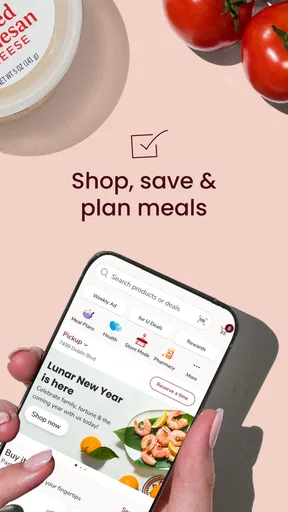
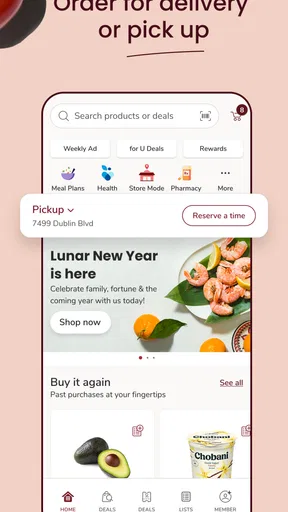
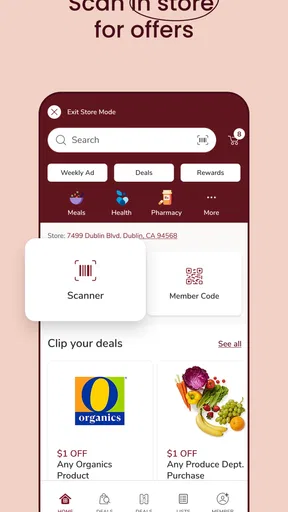
Once you’re in, the app greets you with a clean and user-friendly interface. The home screen is packed with features, yet it doesn’t feel cluttered. You can easily navigate between sections like the weekly ad, coupons, and your shopping list. It’s like having the grocery store at your fingertips!
Before making a large order or relying on the app for a time-sensitive shop, I’d first check that the store information and shopping option match what I need. Pickup and delivery are convenient when available for your chosen store, but they are not interchangeable with a quick in-person visit: an order needs a little planning, while walking into the store gives you direct control over what goes in your cart. I use the app to prepare, then choose the method that fits the day.
Exploring Features
Now, let’s talk features. The Safeway Deals & Delivery app is all about convenience and savings. The weekly ad section is where I find myself spending a lot of time. It’s like flipping through the newspaper ads but without the ink-stained fingers. You can browse through all the current deals and add items directly to your shopping list.
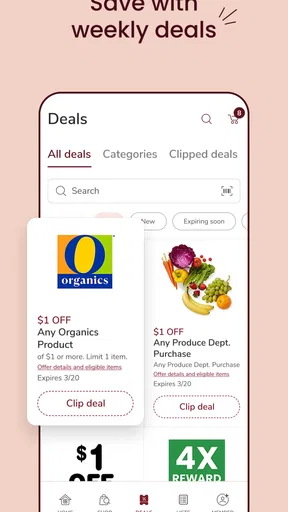
The coupons section is another goldmine. You can clip digital coupons with a tap, and they’re automatically applied at checkout. No more fumbling with paper coupons at the register! Plus, the app offers personalized deals based on your shopping habits. It’s like having a personal shopper who knows exactly what you love.
Worth Reading Before You Choose

EA SPORTS FC Mobile 26 Is a Bigger Football Game, but It Takes Time

Flipboard Shows What News Apps Must Do Beyond the Feed

Switching to Android Auto Means Rethinking Your Driving Routine

Google Calendar Makes a Crowded Week Easier to Manage

Ludo King Makes the Most of the Minutes Between Plans

Baby Panda World Brings Quick Play to Modern Phones, but Its Game Library Feels Busy
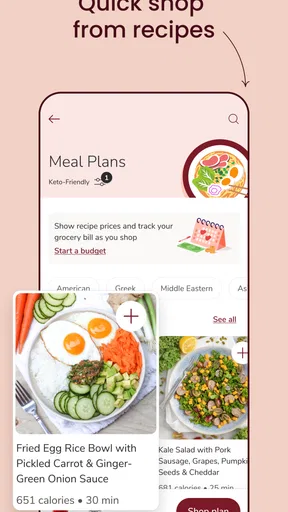
My practical tip is to browse offers before writing the final list, then check the list against the actual meals or household needs I have in mind. A deal is only a saving if I would use the item; otherwise, it can lead to an unnecessary purchase. I also make a quick pass through clipped coupons before paying, rather than assuming every offer applies to every product. That small habit helps me catch mismatches while there is still time to adjust the basket.
For a household with repeat purchases, the app works best as part of a weekly routine: check the ad, clip relevant coupons, and build the list around essentials first. Then I consider discounted extras, rather than letting the offers dictate the whole shop. This keeps the app useful without turning browsing into a hunt for bargains I never intended to buy.
Shopping List & Delivery
Creating a shopping list has never been easier. You can manually add items, scan barcodes, or add items directly from the deals and coupons sections. The list is organized by aisle, which is a lifesaver when you’re navigating the store. It’s a simple feature, but it truly makes the shopping trip more efficient.
Now, if you’re like me and sometimes dread the trip to the store, the delivery feature is a game-changer. You can shop right from the app and have your groceries delivered to your doorstep. The delivery service is reliable and timely, with options for same-day delivery in most areas. You can even schedule your delivery for a time that suits you best.
A useful way to avoid last-minute scrambling is to keep the list as a running plan, not just something I create in the parking lot. When I notice a staple is running low, I add it; when shopping day comes, I can sort out what is truly needed and choose pickup, delivery, or an in-person trip. Scanning a barcode can also help when I want to add a specific packaged item without typing its name, while adding from an offer makes it easier to connect a deal with the item I’m considering.
For example, on a busy evening I might check the ad during a break, add the ingredients and household basics I already need, clip any matching coupons, and then see whether pickup or delivery suits the schedule. If I’m already near the store, the aisle-organized list is more useful; if leaving home is the main obstacle, ordering through the app makes more sense. That flexibility is the strongest part of the shopping flow, not a promise that every situation will be faster online.
Settings and Shopping Habits
I’d make a quick check of the account and store choices before building a substantial basket. That way, I’m not spending time on deals or a shopping plan for the wrong location. I also pay attention to the selected fulfillment method as I shop, because a list intended for a store visit and an order intended for pickup or delivery are different plans. The app is easier to trust when I confirm those basics instead of rushing straight to checkout.
Experienced shoppers can make the routine faster without relying on obscure tricks. I use a repeatable order: confirm the store, review the weekly ad, clip only useful coupons, add essentials, and then choose how to get the groceries. Keeping that sequence prevents me from repeatedly bouncing between sections. It also makes the app less distracting: I can stop browsing once the needed items are covered rather than treating every promotion as a reason to keep shopping.
Compared with a paper list, this app has the advantage of connecting the shopping plan to Safeway’s deals and digital coupons. Compared with a general grocery-list app, its appeal is the closer tie to Safeway shopping rather than broad store neutrality. But that same focus is a trade-off: shoppers who regularly compare several grocery chains may prefer a multi-store planning approach, and anyone who rarely shops at Safeway will get less value from a store-specific app.
Where the Convenience Has Limits
I wouldn’t assume that app-based shopping removes every decision or inconvenience. Digital offers require a little attention, and a list can still need checking before checkout. Delivery and pickup are useful alternatives to visiting the store, but I’d choose based on the task: for a small urgent purchase or when I want to select items myself, an in-person trip may be simpler. For a planned shop when time is tight, ordering ahead can be the better fit.
The original shopping-list experience can also have occasional syncing issues. That is a small but real reason not to treat the app as the only record of an important order: before setting off or placing an order, I’d reopen the list and make sure the items I expect are still there. If a list is shared informally with someone else, a quick check together is safer than assuming every change has appeared instantly.
People who prefer one grocery service for every retailer should think carefully before making this their main organizer. Safeway Deals & Delivery is most compelling when Safeway is already part of the routine; it is less useful as a neutral comparison tool. Likewise, shoppers who dislike account-based digital coupons may find the paper-list-and-store approach more comfortable, even if it means giving up some of the app’s convenience.
My Personal Take
What I love most about the Safeway Deals & Delivery app is how it turns grocery shopping into a task I actually look forward to. The combination of savings and convenience is hard to beat. The app is also surprisingly intuitive, which makes it accessible for everyone, regardless of tech-savviness.
There are a few minor quirks, like occasional syncing issues with the shopping list, but these are rare and don’t overshadow the overall experience. The customer service is responsive, which adds an extra layer of confidence when using the app.
My recommendation is strongest for regular Safeway shoppers who want deals and list-making in the same place, or for busy people who can benefit from choosing between a store visit and ordering ahead. It is also approachable for someone new to digital coupons, since browsing the ad and clipping offers are straightforward actions. I’d be less likely to recommend it to a shopper who wants to compare prices across unrelated stores, or to someone who shops at Safeway only occasionally and would rather keep a simple list on their phone.
When I’m deciding whether to use pickup or delivery, I start with the practical question: do I need to choose the groceries myself, or is avoiding the trip more important today? I then check the order and list before committing. That is a more reliable way to use the app than expecting it to make every choice automatically. The strongest savings workflow is similarly modest: check offers against planned purchases, clip the ones that fit, and ignore the rest.
Wrapping It Up
In a nutshell, if you’re a fan of efficiency and saving money, the Safeway Deals & Delivery app is definitely worth checking out. It’s not just an app; it’s your go-to tool for smart shopping. So why not give it a try and see how it transforms your grocery shopping routine? Trust me, once you start using it, you’ll wonder how you ever shopped without it!
I’d put it more simply: it can make a familiar Safeway shop easier to plan, but it works best when I stay in charge of the choices. Check the store, build a realistic list, use coupons only when they match what you need, and pick the shopping method that suits that particular day. If those habits sound useful, the app is a sensible free option to try; if your priority is comparing many retailers or shopping somewhere else, a more general tool will likely serve you better.
Pros
- User-friendly interface for easy navigation.
- Comprehensive deal categories available.
- Personalized shopping list feature.
- Seamless integration with loyalty programs.
- Efficient delivery tracking system.
Cons
- Limited availability in certain regions.
- Occasional app performance lags.
- In-app ads can be intrusive.
- Requires stable internet connection.
- Some deals are time-limited.
FAQs for Safeway Deals & Delivery
What are the main features of the Safeway Deals & Delivery app?
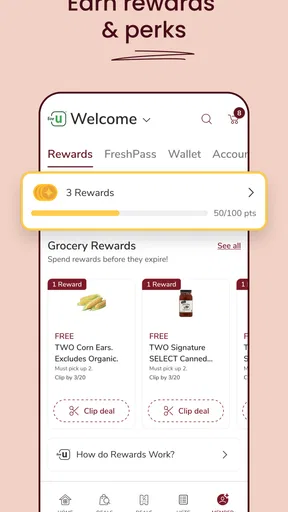
The Safeway Deals & Delivery app offers a variety of features including digital coupons, weekly ads, and personalized deals. Users can also create shopping lists and place orders for delivery or pickup. Additionally, the app allows users to track their rewards and manage their Safeway Club Card, making shopping more convenient and efficient.
How does the delivery service work in the Safeway app?
The delivery service through the Safeway app allows you to shop for groceries from your device and have them delivered to your doorstep. You can schedule delivery times that suit your needs and track your order in real-time. Delivery fees may apply, and availability can vary by location, so it’s best to check the app for specifics.
Is there a membership fee to use the Safeway Deals & Delivery app?
No, there is no membership fee required to use the Safeway Deals & Delivery app. It’s free to download and use. However, while accessing digital coupons and discounts is free, you might encounter fees for certain services like home delivery, which vary depending on your location and order size.
Can I use my Safeway Club Card with the app?
Yes, the Safeway Deals & Delivery app is compatible with your Safeway Club Card. You can link your card to the app to access personalized deals, track your rewards, and ensure your purchases contribute to your club card benefits. This integration makes it easier to manage discounts and rewards conveniently.
Are there any limitations to using digital coupons in the app?
Digital coupons in the app are subject to specific terms and conditions. They may have expiration dates, usage limits, and product exclusions. It’s important to review each coupon’s details before applying them to your purchase. Also, ensure your location supports digital coupon redemption to avoid any issues during checkout.


